A useful AI visibility report answers one question before anything else: did these pages become easier or harder for AI systems to find, interpret, and cite? Every section in this template exists to answer that question with as little noise as possible.
Key Takeaways
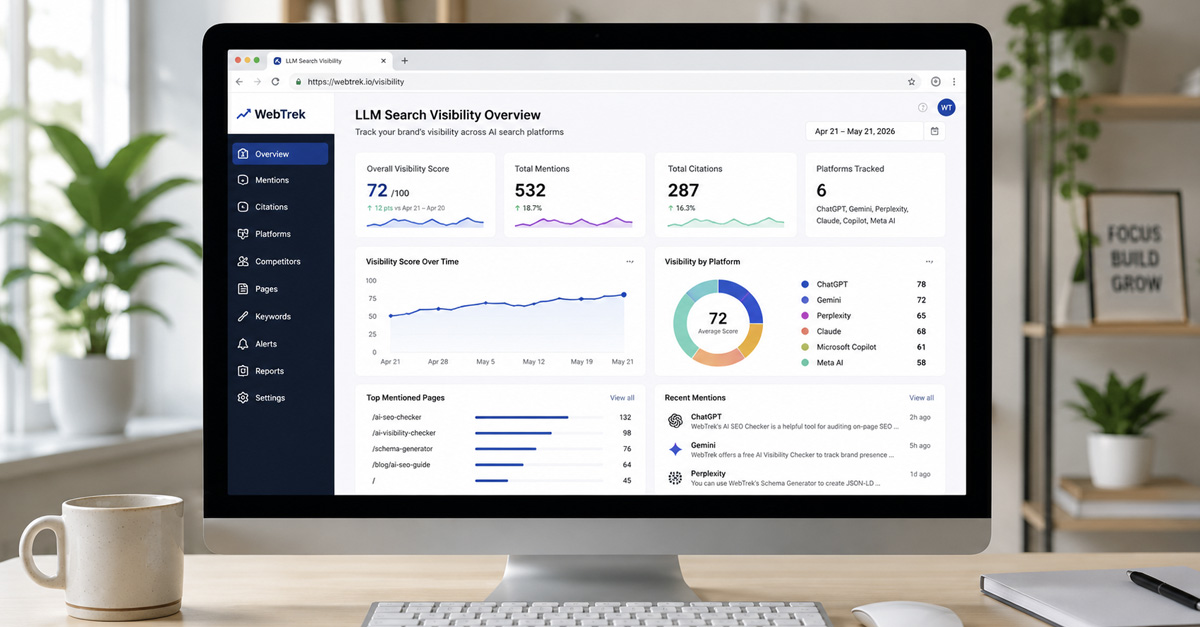
- The most useful AI visibility report is not a dashboard screenshot. It is a structured document that connects scores to gap types and gap types to specific next actions.
- Five sections cover everything a monthly report needs: snapshot header, KPI scorecard, page-level breakdown, gap classification summary, and action items.
- Monthly versions focus on score movement and in-progress fixes. Quarterly versions zoom out to trend direction and whether completed actions actually changed anything.
What This Template Is For
Teams trying to report AI visibility typically run into one of two failure modes. The first is the screenshot dump: a tool score or a dashboard image sent in a Slack message with no context about what changed, why it changed, or what to do about it. The second is the essay report: a long narrative document that covers everything but leads nowhere because it is impossible to pull a specific next action from five pages of analysis.
This template avoids both problems. It gives you a fixed structure with five sections that anyone can fill in consistently, month after month, without starting from a blank page. Each section serves a specific purpose. Together they move from high-level summary to specific fixes in under two pages for a monthly review.
The template is designed to work alongside the monthly AI visibility audit workflow that covers how to gather and classify the underlying data. That post is about the process. This template is the output: the document you produce when the process is done.
The Five Core Sections
Every AI visibility report, whether monthly or quarterly, needs these five sections in this order:
- Snapshot header - a one-screen summary of the period, the pages reviewed, and the overall trend
- KPI scorecard - four to five core metrics with last-period and this-period values
- Page-level breakdown - a table of your most important pages with their current visibility state and primary gap type
- Gap classification summary - a count and interpretation of which gap types are most common this period
- Action items - specific fixes, owners, and deadlines pulled from the findings above
Each section answers a different question. The snapshot header answers: what happened overall? The KPI scorecard answers: did the metrics move? The page-level breakdown answers: which specific pages are the problem? The gap classification answers: what kind of problem is it? The action items answer: what are we doing about it and by when?
Section 1: Snapshot Header
The snapshot header is a one-screen summary that anyone can read in under 30 seconds. It belongs at the top of every report. Its job is to give readers the essential context before they look at any specific number.
Include these fields:
- Report period - the month or quarter this report covers (for example: "May 2026" or "Q2 2026")
- Pages reviewed - the total number of pages included in this report
- Overall AI visibility trend - improving, stable, or declining across the reviewed set
- Most improved page this period - the URL or page label that showed the most positive movement
- Biggest gap identified this period - the single most important problem surfaced in this review
- Summary sentence - one sentence that captures the period in plain terms, for example: "This month, three pages improved their visibility scores, two pages declined, and the most common gap type was interpretation."
Write the snapshot header last, after all other sections are complete. The summary sentence is easy to write once you have the data in front of you. Writing it first leads to vague, forward-looking language that does not reflect what the report actually found.
Section 2: KPI Scorecard
The KPI scorecard tracks a small set of consistent metrics so the report can show trend direction over time. For each metric, include the last-period value, the current value, the direction of change, and a simple status label (on track, needs attention, or urgent).
The five metrics that belong in most AI visibility scorecards:
- AI visibility score - your primary benchmark, measured by running the Free AI Visibility Checker on your key pages. This is the core number the rest of the report interprets.
- Page interpretation score - how clearly your pages communicate their main topic and entity to AI systems. Run the Free AI SEO Checker on your most important pages and note the overall result.
- Citation trend - whether AI tools are referencing or surfacing your brand more or less frequently than last period. This can be tracked through manual checks across ChatGPT, Gemini, and Perplexity using consistent prompts each month.
- Entity consistency status - whether your brand name, product names, and topic entities are recognized consistently across AI-generated responses. Discrepancies between how different tools describe your business are a signal to flag here.
- Schema health - whether your structured data errors are increasing, stable, or improving, based on a scan with the Free AI SEO Checker or Google Search Console's rich results report.
Do not add metrics you cannot actually fill in. If you have no reliable citation data this month, mark the field as "not tracked this period" rather than leaving it blank or estimating. Blank or invented numbers destroy the credibility of the scorecard over time.
The KPI scorecard is also where it is worth noting when a metric held steady at a low level. A stable score below your target is not good news. It is a signal that the gap classification section needs a closer look.
For a deeper breakdown of what these metrics measure and how generative engines use them, see AI Visibility vs Traditional Rankings: New KPIs for Modern Search.
Section 3: Page-Level Breakdown
The page-level breakdown is a table. It turns the overall scorecard trend into something specific: which pages are the problem, how bad is it, and what type of problem are we dealing with?
The table should include these columns:
| Page | AI Visibility Score | Change | Primary Gap Type | Priority | Notes |
|---|---|---|---|---|---|
| /homepage | [score] | [+/- points] | Interpretation | High | [free text] |
| /services/[name] | [score] | [+/- points] | Discovery | Medium | [free text] |
| /blog/[slug] | [score] | [+/- points] | Support-structure | Low | [free text] |
You do not need to include every page on your site. The table should cover:
- Your five to ten most commercially important pages
- Any page that showed a significant score drop this period
- Any page you actively worked on this period, to verify whether the fix had an effect
The "Primary Gap Type" column carries the most weight in the table. Each page's gap type determines what kind of fix is needed, and grouping pages by gap type in the next section is what makes the report actionable rather than just informational.
The three gap types and what they mean:
- Discovery gap - AI systems have trouble finding or indexing this page at all. Common causes include crawl barriers, thin content, or pages that are too isolated from the rest of the site.
- Interpretation gap - the page can be found, but AI systems struggle to understand what it is about, who it is for, or what it says about the brand. Common causes include unclear entity definitions, missing or broken schema, or heading structures that do not communicate the topic.
- Support-structure gap - the page itself is clear, but it lacks surrounding support: internal links pointing to it, related blog posts reinforcing the topic, or citations from external sources that corroborate its claims.
Section 4: Gap Classification Summary
This section is short. It counts the gap types from Section 3 and interprets the pattern.
The format:
- Discovery gaps: [number of pages]
- Interpretation gaps: [number of pages]
- Support-structure gaps: [number of pages]
Then write one interpretive sentence: which gap type is most common this period, and what does that suggest about where to focus?
This sentence is the most useful part of the entire report for anyone who does not have time to read the full page table. If six of your ten reviewed pages have interpretation gaps, the priority for this period is page clarity work: entity definitions, heading structure, schema, and answer-ready content. If most pages have support-structure gaps, the priority is internal linking, related blog creation, or external corroboration, not further page rewrites.
Gap classification also prevents the most common reporting mistake: treating all weak pages as the same type of problem and applying the same fix to all of them. Discovery gaps, interpretation gaps, and support-structure gaps require different fixes. Identifying the dominant type each period makes the action items in the next section much easier to write.
Section 5: Action Items
Action items are where the report earns its value. Every finding in Sections 2, 3, and 4 should lead to at most one specific, ownable task. If a finding does not lead to an action, it should not be in the report.
The format for each action item:
- Action - the specific task, written precisely enough that someone can execute it without asking a follow-up question
- Page - the URL or page label this action applies to
- Owner - the person responsible
- Due date - when this should be completed before the next report
- Status - to be filled in at the next review: done, in progress, or carried forward
Keep the action items list short. Three to five items per monthly report is realistic for most teams. If you surface more than five findings worth acting on, prioritize by impact and carry the rest to the following month. An action items list that grows longer each month and never gets shorter is a sign the report is tracking problems without fixing them.
Good action items are specific and direct:
- "Add FAQ schema to the homepage using the Free JSON-LD Schema Generator" is a good action item.
- "Improve schema" is not.
- "Rewrite the H1 on the services page to include the primary entity name" is a good action item.
- "Fix content clarity" is not.
- "Publish a supporting blog on [specific topic] with an internal link to the pillar page" is a good action item.
- "Create more content" is not.
At the start of the next review period, the first thing you do with this section is check the status column. Completed actions get reviewed: did they move the score or change the gap classification? Carried-forward actions get re-prioritized. If the same action item carries forward more than two months, it needs to either become a higher priority or be removed as unrealistic.
Monthly vs. Quarterly Versions
The five-section structure works for both monthly and quarterly reporting, with one key difference in emphasis.
Monthly report - focus is on recent movement and in-progress fixes. Length is one to two pages. The audience is whoever is making content or technical changes. The central question is: what happened this month, and what are we doing about it before next month?
Quarterly report - uses the same five sections, but adds two things. First, a trend chart or trend narrative covering the last three monthly snapshots: did scores generally improve, hold steady, or decline? Second, a review of which action items from the previous quarter were completed and whether they led to measurable change. Length is three to five pages. The audience typically includes stakeholders who do not run the fixes themselves.
The quarterly report should answer one question that the monthly report does not need to answer: "Are we meaningfully more visible to AI systems than we were three months ago, and do we understand why or why not?" If the answer is yes with evidence, the quarterly report demonstrates progress. If the answer is no or unclear, the quarterly report identifies what blocked progress and what the next quarter needs to prioritize differently.
How to Fill In Each Section
This is the sequence that works most efficiently:
- Start with Section 3 (page-level breakdown). Run the Free AI Visibility Checker on each page in your review set. Pull the scores and compare to last month. Classify the gap type for each page based on what the checker surfaces. This section takes the most time and produces the data that all other sections depend on.
- Move to Section 4 (gap classification). Count the gap types from Section 3. Write the interpretive sentence. This takes five minutes once Section 3 is complete.
- Fill in Section 2 (KPI scorecard). Use the scores from Section 3 to update the AI visibility score field. Run the Free AI SEO Checker on your most important pages for the interpretation score field. Do manual checks across ChatGPT, Gemini, and Perplexity for the citation trend field: use two or three consistent prompts that are relevant to your business and note whether the responses are similar, better, or worse than last month.
- Write Section 5 (action items). Pull from the findings in Sections 3 and 4. Keep it to three to five items. Assign owners and deadlines before the report is finalized.
- Write Section 1 (snapshot header) last. The summary sentence writes itself once all the other sections are complete. Fill in the "most improved page" and "biggest gap identified" fields from what you found in Section 3.
For the citation trend field specifically: there is currently no tool that gives you a precise citation count across AI systems. Manual checks are the practical approach. Use the same two or three prompts every month so the comparison is consistent. The goal is directional awareness, not a precise metric. Noting "Gemini now surfaces our brand in response to [topic prompt] where it did not last month" is a valid and useful data point even without a number attached.
Adapting for Different Audiences
The five-section structure is the foundation. How you present it changes depending on who is reading it.
Solo owner or solo practitioner: skip the "Owner" column in action items since it is always you. If you already know your gap types intuitively from running the audit, you can simplify Section 4 to a single sentence. Keep Sections 1, 3, and 5 as the non-negotiable core: snapshot, page table, and action items. That is enough to stay on track month to month without creating overhead that makes you skip the process.
Marketing team: use all five sections. Keep action items tied to named team members. Share the monthly report in the same location every month so the team develops a consistent reference point. Use the quarterly report at the start of each quarter planning session to determine where AI visibility work fits in the broader roadmap.
Client-facing use: replace technical gap type labels with plain-language equivalents. Replace "interpretation gap" with something like "how clearly this page communicates its main topic to AI systems." Replace "support-structure gap" with "how well the surrounding site reinforces this page's authority on the topic." Add a two-sentence explanation of what AI visibility means at the top of the report for stakeholders who are new to the concept. Keep the action items section highly specific so clients can see exactly what work is being done on their behalf and verify it at the next review.
What to Leave Out
The most common reporting mistakes are about inclusion, not omission. Here is what tends to make AI visibility reports less useful:
Raw scores without interpretation. A number by itself tells nobody what to do next. Every score in the report should be accompanied by either a trend direction, a gap type classification, or both.
Too many pages. Reporting on 60 or 80 pages monthly creates noise, not signal. Narrow the review set to the pages that actually matter for your traffic and conversion goals. You can expand coverage over time as the process becomes routine.
Metrics you cannot actually measure this period. If you have no reliable citation data, say "not tracked this period" and move on. A placeholder or estimate corrodes the report's credibility faster than a missing field does.
Vanity movements. A two-point score increase on a page that received no changes and has no strategic importance does not belong in the snapshot header as a win. Report movements that are meaningful in the context of the work being done.
The audit process itself. The report is the output of the audit. How you ran the audit, which tools you used, and what you looked at are relevant context for a new client or a new team member, but they do not belong in the body of a recurring monthly report that the same people read every month.
FAQ
How long should filling in this template take?
A monthly report using this template takes roughly 45 to 90 minutes once your tools are set up. The first time takes longer because you are establishing a baseline and deciding which pages belong in your review set. Subsequent months go faster because you are comparing against an existing record rather than starting from scratch.
Can I use this template without a paid tool?
Yes. The Free AI Visibility Checker and the Free AI SEO Checker cover the data needs for Sections 2 and 3. Manual checks across ChatGPT, Gemini, and Perplexity supplement the citation trend field. You do not need a paid subscription to produce a useful monthly report using this structure.
What if my scores do not change month over month?
Stable scores are not automatically bad. They may mean your pages are holding at a consistent level. The more important question is whether that level is where you want to be. If scores are stable but low, investigate the gap type more carefully rather than waiting for the number to move on its own. A stable low score is usually a sign that the gap has been correctly identified but not yet addressed.
What format should the report use: document, spreadsheet, or slide deck?
Whatever format gets read and acted on by the people involved. For solo owners, a simple document or a spreadsheet with the five sections as tabs works well. For teams, a shared document with comment threads and version history makes it easy to track whether action items are carried through from month to month. For client-facing quarterly reviews, a slide deck lets you walk through the narrative section by section without overwhelming stakeholders with raw data.
What is the difference between a monthly and a quarterly report?
A monthly report focuses on recent score movement and specific in-progress fixes. A quarterly report uses the same five sections but adds a trend narrative covering the previous three months, a review of which action items were completed, and a direct answer to the question: are we meaningfully more visible to AI systems than we were three months ago? The monthly report answers "what changed and what are we doing about it?" The quarterly report answers "is the work we are doing actually moving the overall trajectory?"